Walt can tell you about the house by email, by push notification on your phone or computer, or both. You choose what you hear about and how.
Choose what you hear about
Open your Profile (tap your name in the menu) and tap What you hear about under Notifications. There are two lists, each with an Email and a Push column:
Notify me when…
- A work order is assigned to me
- I'm @mentioned on a work order
- I file a work order (an email confirmation only)
- Someone asks to see documents, or my ask to see documents is answered
- Someone asks me for money, or answers my ask (a push only, for whoever looks after the family's money)
Adults also see A new work order is filed and Someone comments on a work order nobody has taken on.
Notify me when a work order I follow…
- Gets a comment
- Moves to a new status
- Is closed (Done or Won't fix)
- Is ready to start, because nothing is blocking it any more
- Is assigned to someone else
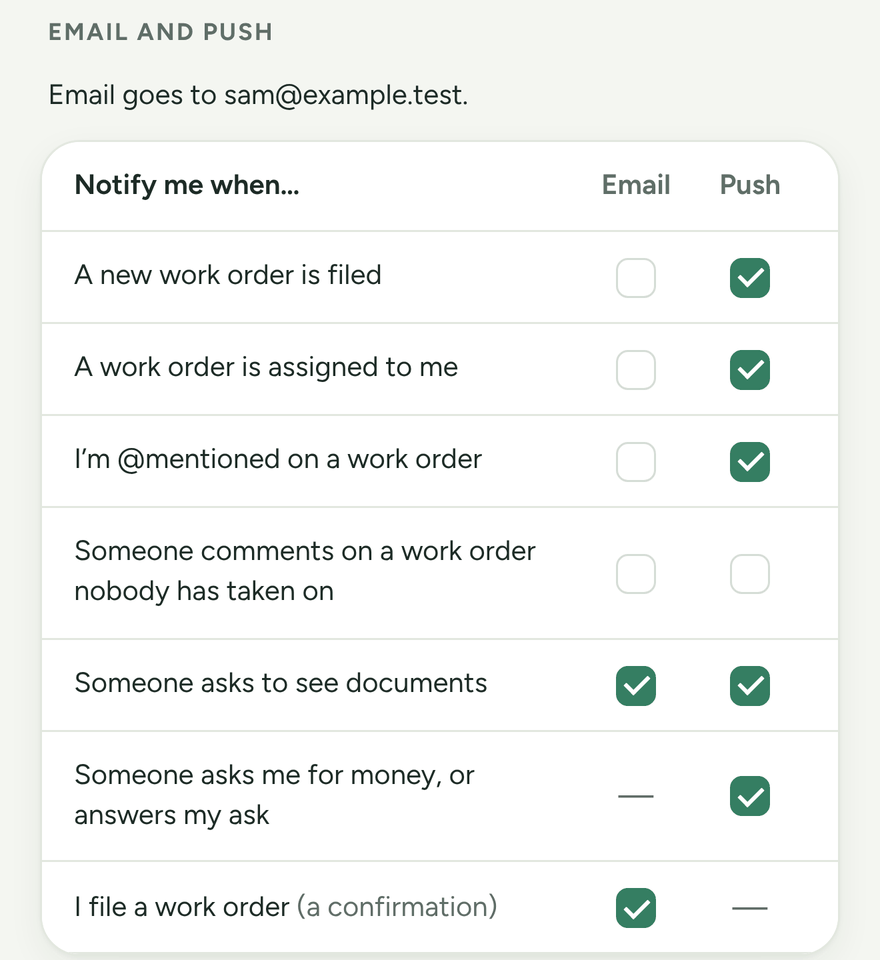
Tick the boxes you want and tap Save on the bar that appears.
Email needs an email address on your Profile. If you don't have one, the Email column says so.
Turn on push notifications
Push notifications are set up per device, so do this on each phone or computer you use.
- Open your Profile on that device.
- Under Notifications on this device, tap Turn on notifications on this device.
- Allow notifications when your browser asks.
On an iPhone or iPad, add Walt to your Home Screen first: open heywalt.app in Safari, tap the Share button, then Add to Home Screen. Open Walt from the new icon and turn notifications on from there.
If it says notifications are blocked, allow them for heywalt.app in your browser's site settings, then try again.
Quiet hours
Quiet hours stop your devices buzzing overnight. Nothing buzzes during quiet hours, chore reminders included, unless a work order is an emergency. Email still arrives.
The house has its own quiet hours, which an organizer sets in Settings. You can set your own instead under Quiet hours in your Profile.
Following work orders
Tap Follow on any work order to hear about it. Walt follows a work order for you when someone @mentions you on it, unless you turn off Auto-follow when mentioned under What you hear about in your Profile.