Walt keeps track of the house so you don't have to: what's broken, what's coming due, and who's on it. This article takes you from an invite code to your first work order in about five minutes.
Sign up
Walt is invite-only for now. If you don't have a code yet, tap Request an invitation on the sign-up page.
- Go to heywalt.app and tap Sign up.
- Enter your Invite code (8 letters and numbers) and your Email, then tap Email me a set-up code.
- Check your email for a 6-digit code. Enter it, give your household a name (most families use their surname, like "The O'Briens"), and tell Walt what to call you.
- Agree to the privacy policy and terms, then tap Create household.
You're now an organizer in the household, the role that can do everything. If the address you used already has an account, Walt emails you a sign-in link instead of a set-up code.
Sign in next time
On the sign-in page, enter your email and Walt sends you a link and a 6-digit code. Tap the link, or type the code on the device you're signing in on. There's no password to remember. If your Walt offers it, Continue with Google works too.
File your first work order
A work order is anything around the house that needs doing: a leaky tap, a gate that won't latch, a filter to order.
- On your phone, tap the round + in the middle of the bar at the bottom. On a computer, open Work orders and tap +.
- Say what it's about in a few words, for example "Back gate latch does not catch".
- Add a photo if you have one. A photo says it faster than typing.
- Pick how urgent it is: Emergency, Normal or Whenever.
- Tap File it.
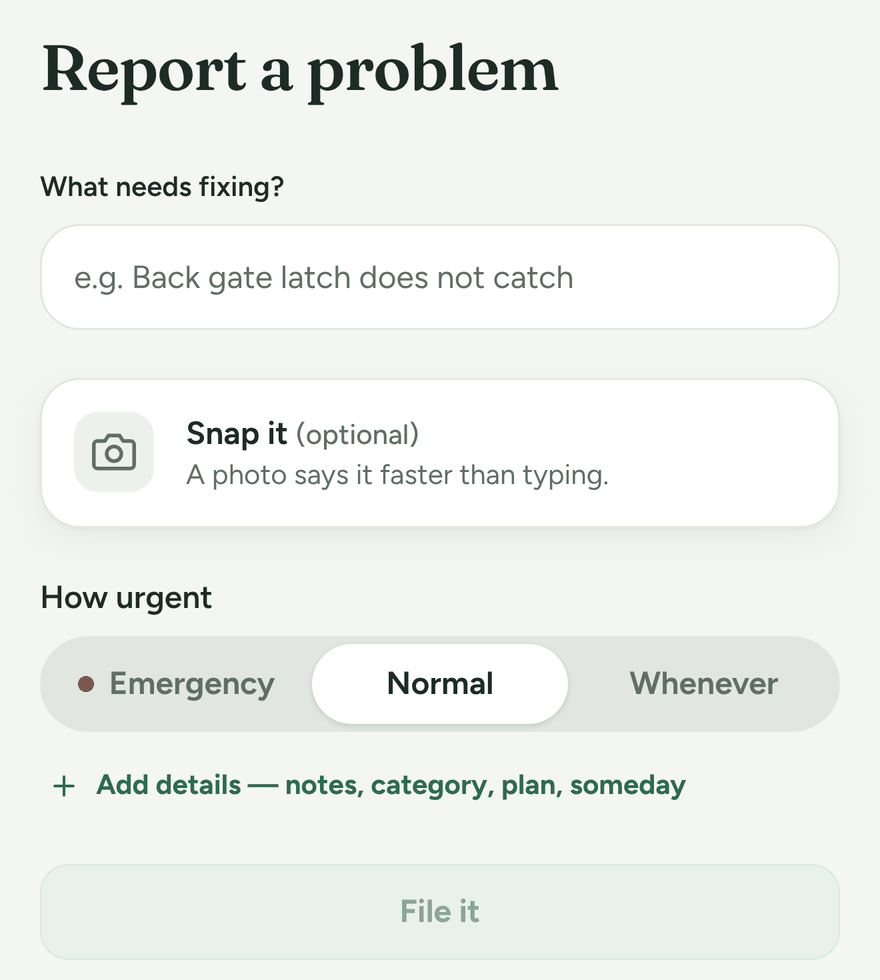
That's all you need. Everything else on the form is optional: room, how big the job is, a date to plan it for or a due date. If it's a someday idea, tap Someday idea — no dates, no nagging to park it.
Find your way around
- Now what? is where your day starts: what's yours and what's next.
- Work holds Work orders and Maintenance.
- House holds your Things, Vehicles, Climate, Sensors, Energy and Documents.
- Family and Calendar are where the whole household meets.
Next steps
- Invite the rest of your household (see Invite your family).
- Add a few things you own, like the furnace or water heater, so Walt can remind you about their upkeep (see Maintenance schedules).