If your sensors and locks live on a hub Walt has no sign-in for, such as Hubitat, Z-Wave JS, Home Assistant or a script on a home server, the hub can send their battery and connection to Walt itself. Walt never reaches into your house, and the hub can never lock, unlock or change anything. It can only send readings.
Set it up
- Go to House → Sensors and tap + Connect sensors.
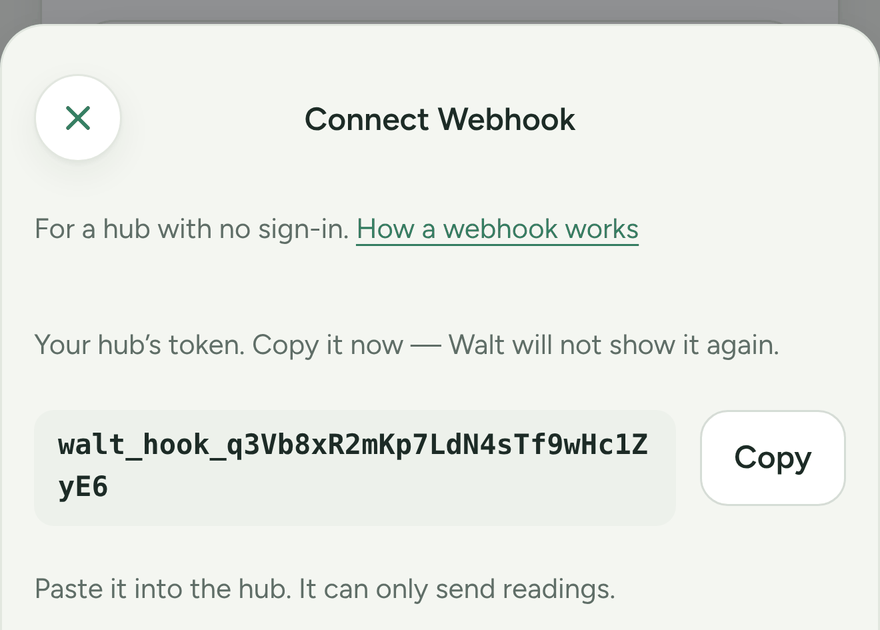
- Pick Webhook, give the hub a name you'll recognise, such as "Hubitat in the closet", and tap Make webhook token.
- Copy the token straight away. Walt shows it once and keeps only a scrambled copy, so nobody can read it back later, including you.
- Have the hub send a
POSTtohttps://heywalt.app/api/ingest/readingsevery few minutes, with the headerAuthorization: Bearerfollowed by the token.
To try a token before you set up the hub, send this from any computer's terminal, with your token in place of the example:
curl -i https://heywalt.app/api/ingest/readings \
  -H "Authorization: Bearer walt_hook_paste_your_token_here" \
  -H "Content-Type: application/json" \
  -d '{"devices": [{"id": "test-1", "name": "Test lock", "kind": "lock", "powerType": "cell", "reachable": true, "batteryLevel": 64}]}'
Walt answers 202 Accepted and a "Test lock" shows on House → Sensors. The hub's first real post replaces it, because each post is the whole list.
Each hub gets its own token. To see your hubs again, when each last posted, and to add or revoke one, open + Connect sensors, then the Webhook tile's ⋯ and Manage tokens.
What the hub sends
The body is JSON with a devices list. Each device is one object with these fields:
id: your hub's own id for the device, such as a Z-Wave node id. Keep it the same on every post.name: what to call it, such as "Front Door". Optional.kind: one oflock,contact,motion,leak,smoke_co,keypad,opener,hub,bulb,vent,room_sensororother.powerType:cell,rechargeableorwired.reachable:trueorfalse.batteryLevel: 0 to 100. Optional.batteryStatus:full,ok,low,failed,chargingornone, for devices that report a word instead of a number. Optional.temperatureFortemperatureC, andhumidity: for sensors that measure them. Optional.
A lock at 64% battery looks like this:
{
  "devices": [
    {
      "id": "zwave-12",
      "name": "Front Door",
      "kind": "lock",
      "powerType": "cell",
      "reachable": true,
      "batteryLevel": 64
    }
  ]
}
Send every device on each post, up to 100. A device left out of a post is treated as removed.
Meters
A post can also carry a meters list, for running totals such as a circuit's energy use or the water line's gallons. Walt keeps the difference between posts. Each meter has:
id: your hub's own id for the meter. Keep it the same on every post.name: what to call it, such as "Dryer circuit". Optional.utility:electric,gasorwater.unit: for electric,kWhorWh. For gas,therm,ccf,ft3orm3. For water,gal,L,ft3orm3.total: the running total, in that unit. Send the counter itself, not the amount since the last post.rate: what it is using right now, in watts for electric. Optional.wholeHouse:truefor the meter on the whole house, such as the panel or the gas meter. Optional.
A plug that has used 1,250 Wh and is drawing 300 W looks like this:
{
  "meters": [
    {
      "id": "plug-dryer",
      "name": "Dryer plug",
      "utility": "electric",
      "unit": "Wh",
      "total": 1250,
      "rate": 300
    }
  ]
}
A Shelly smart plug can send this by itself, with no hub: see Send a Shelly sensor straight to Walt.
Home Assistant
Home Assistant can send its devices' batteries and connection to Walt with a command and an automation that you paste in. Walt never gets a Home Assistant token, so it can't see or change anything in your house. You need Home Assistant 2024.10 or newer.
1. Make a token in Walt
- Go to House → Sensors, tap + Connect sensors and pick Home Assistant.
- Tap Make webhook token and copy the token straight away. Walt shows it once.
2. Label the devices for Walt
- In Home Assistant, open Settings → Areas, labels & zones → Labels and create a label called Walt.
- Open Settings → Devices & services → Devices, tick each device you want Walt to watch, such as locks, door sensors and leak sensors, and add the Walt label to them.
Walt reads each labelled device's battery, whether Home Assistant can still reach it, and its temperature and humidity if it measures them. It works out what kind of device it is from its entities: a lock, a door or window sensor, a motion, leak or smoke sensor, or a room sensor. Up to 100 devices.
3. Add the token and the command
Open your secrets.yaml and add this line, with your token after the word Bearer:
walt_token: "Bearer walt_hook_paste_your_token_here"Then open your configuration.yaml and paste this at the end. You don't need to change any of it.
rest_command:
  walt_readings:
    url: https://heywalt.app/api/ingest/readings
    method: post
    headers:
      Authorization: !secret walt_token
    content_type: application/json
    payload: >-
      {% set ns = namespace(out=[]) %}
      {% for d in label_devices('walt')[:100] %}
        {% set n = namespace(kinds=[], level=none, low=none, bat=none, up=false, temp=none, unit=none, hum=none) %}
        {% for e in device_entities(d) %}
          {% set dom = e.split('.')[0] %}
          {% set dc = state_attr(e, 'device_class') %}
          {% set s = states(e) %}
          {% set live = s not in ['unavailable', 'unknown'] %}
          {% if live %}{% set n.up = true %}{% endif %}
          {% if dc == 'battery' %}
            {% set n.bat = live if n.bat is none else (n.bat or live) %}
            {% if dom == 'sensor' and s | is_number %}{% set n.level = [0, [s | float | round | int, 100] | min] | max %}{% endif %}
            {% if dom == 'binary_sensor' and live %}{% set n.low = s == 'on' %}{% endif %}
          {% endif %}
          {% if dom == 'lock' %}{% set n.kinds = n.kinds + ['lock'] %}{% endif %}
          {% if dom == 'binary_sensor' %}
            {% if dc in ['smoke', 'carbon_monoxide', 'gas'] %}{% set n.kinds = n.kinds + ['smoke_co'] %}{% endif %}
            {% if dc == 'moisture' %}{% set n.kinds = n.kinds + ['leak'] %}{% endif %}
            {% if dc in ['door', 'window', 'opening', 'garage_door'] %}{% set n.kinds = n.kinds + ['contact'] %}{% endif %}
            {% if dc in ['motion', 'occupancy', 'presence'] %}{% set n.kinds = n.kinds + ['motion'] %}{% endif %}
          {% endif %}
          {% if dom == 'sensor' and live and s | is_number %}
            {% if dc == 'temperature' and n.temp is none %}
              {% set n.temp = s | float %}{% set n.unit = state_attr(e, 'unit_of_measurement') %}
              {% set n.kinds = n.kinds + ['room_sensor'] %}
            {% endif %}
            {% if dc == 'humidity' and n.hum is none %}{% set n.hum = s | float %}{% endif %}
          {% endif %}
        {% endfor %}
        {% set kind = (['lock', 'smoke_co', 'leak', 'contact', 'motion', 'room_sensor'] | select('in', n.kinds) | first) or 'other' %}
        {% set dev = {
          'id': 'ha:' ~ d,
          'name': ((device_attr(d, 'name_by_user') or device_attr(d, 'name') or '') ~ '')[:120],
          'kind': kind,
          'powerType': 'wired' if n.bat is none else 'cell',
          'reachable': n.up if n.bat is none else n.bat,
        } %}
        {% if n.level is not none %}{% set dev = dict(dev, batteryLevel=n.level) %}
        {% elif n.low is not none %}{% set dev = dict(dev, batteryStatus='low' if n.low else 'ok') %}{% endif %}
        {% if n.unit == '°F' and -58 <= n.temp <= 158 %}{% set dev = dict(dev, temperatureF=n.temp) %}
        {% elif n.unit == '°C' and -50 <= n.temp <= 70 %}{% set dev = dict(dev, temperatureC=n.temp) %}{% endif %}
        {% if n.hum is not none and 0 <= n.hum <= 100 %}{% set dev = dict(dev, humidity=n.hum) %}{% endif %}
        {% set ns.out = ns.out + [dev] %}
      {% endfor %}
      {"devices": {{ ns.out | to_json }}}
Restart Home Assistant from Settings → System, so it reads the new command.
4. Send it every five minutes
Open Settings → Automations & scenes, tap Create automation, then Create new automation. Open the ⋮ menu at the top, pick Edit in YAML, and replace what is there with this:
alias: Send device health to Walt
description: Batteries and connection of every device labelled Walt.
mode: single
triggers:
  - trigger: time_pattern
    minutes: /5
  - trigger: homeassistant
    event: start
conditions:
  - condition: template
    value_template: "{{ label_devices('walt') | count > 0 }}"
actions:
  - action: rest_command.walt_readings
    response_variable: walt
  - if:
      - condition: template
        value_template: "{{ walt.status != 202 }}"
    then:
      - action: system_log.write
        data:
          level: warning
          message: "Walt answered {{ walt.status }}: {{ walt.content }}"
Tap Save. Within five minutes the devices show on House → Sensors.
If nothing shows up
Open Settings → System → Logs and search for Walt.
- Walt answered 401 means the token in
secrets.yamlis wrong or was revoked, or the word Bearer and its space are missing. Make a new token and paste it in. - Walt answered 400 means the post was refused. The message after it says which field.
- No line at all means the automation has not run. Check that at least one device has the Walt label.
Good to know
- To stop Walt watching a device, take the Walt label off it. Walt treats it as removed on the next post.
- A device shows as offline in Walt when Home Assistant marks its battery unavailable, which is how Zigbee and Z-Wave report one that has stopped answering.
- If Home Assistant itself stops posting for a while, Walt says so on the Sensors page.
- Walt only reads. The token can send readings and nothing else, and Home Assistant never hands Walt a way back in.
Lost a token, or replacing a hub?
Make a new token for the hub, paste it in, then revoke the old one from its ⋯. The old token stops working the moment you revoke it.
Walt is not an alarm system
Walt shows battery and connection, never alarms. Even if your hub sends one, Walt drops it. Keep relying on your detectors and your hub's own alerts for leaks, smoke and carbon monoxide.